GEICO Mobile - Car Insurance
- 4.5
- Rating
- 10.00M
- Installs
- Free
- Price

 Analysis by App-foxy
Managing car insurance from a phone sounds simple until you need something quickly: a digital insurance card, a policy detail, a payment-related task, or help after a stressful moment on the road. I spent time looking at GEICO Mobile from that practical angle, focusing less on the polished promise of convenience and more on what happens when setup, sign-in, or a routine task does not go smoothly. My impression is that it is a useful companion for GEICO customers, but its value depends heavily on having the right policy information and account access ready before an urgent situation arrives.
This is a free finance app from GEICO Insurance, aimed at everyday car-insurance management rather than general budgeting or financial planning. It is rated for Everyone, runs on Android 8.0 and newer, and the current Android release is version 5.100.1. Its popularity is substantial, with a 4.5 average from roughly 510 thousand ratings and more than 10 million installs. Those figures suggest that it has become a familiar tool for many policyholders, although popularity does not remove the occasional friction that comes with account-based apps.
Where GEICO Mobile Usually Saves Time—and Where Users Get Stuck
The first thing I noticed is that this is not an app you install simply to browse information. It is tied to your relationship with GEICO, so the useful parts begin after the app recognizes your account. That makes it more practical than a generic insurance reference app, but it also means a forgotten login, an outdated phone number, or a mismatch in account details can stop progress before you reach the screen you need.
You May Also Like

 Blood Strike: 2.5 Anniversary
Blood Strike’s Loadouts Turn Every Drop Into a Tactical Gamble
A close look at Blood Strike’s custom loadouts: how fast access to signature weapons reshapes its battle royale rhythm, rewards preparation, and narrows the gap between fights.

 Pandora - Music & Podcasts
Pandora’s Music Is Easy to Start, but Harder to Recover
Pandora’s strength is its low-effort path from a seed to a station. Its weak spot is how much confidence it asks you to place in connection, setup, and quiet recovery.

 8 Ball Pool
 Is Built on Rivalries, Rematches, and Routine
A close look at the rivalries, rematches, shared routines, and unanswered safety questions that turn a quick pool match into a persistent mobile community.

 Samsung Music
’s Quiet Strength Is Playing What You Already Own
Its reach comes less from spectacle than from dependable access to a personal library. That simplicity is both the app’s strongest retention engine and its ceiling.

 AccuWeather: Weather Radar
AccuWeather Review: A Quick, Clear Forecast for Everyday Decisions
For everyday plans, the best forecast is the one you can understand quickly. AccuWeather makes rain timing, radar, and local conditions easy to act on, with a few trade-offs.

 Hill Climb Racing
Why Hill Climb Racing Still Turns Crashes Into One More Run
A tiny car, a bumpy hill and one more upgrade: Hill Climb Racing keeps resurfacing because its simple chaos makes every near-miss feel personal.
More From Our News Desk



A common point of frustration is expecting the app to behave like a standalone wallet. Insurance information is personal and account-specific, so the app needs a successful sign-in before it can present your policy-related details. If you are downloading it while standing beside a damaged vehicle, a failed login can feel like an app failure even when the real issue is account access. My advice is to sign in once during a calm moment and check that the account opens correctly before you depend on it away from home.
Another stumbling block is choosing the wrong task in a hurry. Insurance apps often place several kinds of service behind related menus, and a user who wants proof of coverage may instead start looking through payment or policy-management areas. GEICO Mobile is easier to use when you begin with the exact outcome you want: view policy information, handle a payment-related need, check a document, or contact support. Thinking in terms of the outcome keeps you from tapping through every menu.
The best time to test the app is before you need it. Open it on a normal day, confirm that your account is accessible, and look for the information you would want during a roadside incident. This small check is more valuable than simply having the icon installed. It also gives you a chance to notice whether your device, connection, or saved credentials create a problem while the stakes are low.
There is a second kind of friction that is easy to overlook: the difference between what an insurer can display and what a customer expects to edit instantly. A policy may involve multiple vehicles, drivers, dates, or documents, and not every change is necessarily a one-tap operation. If the app directs you toward a support or service path instead of completing an action immediately, that does not automatically mean it is broken. It may be routing a sensitive request through a more appropriate channel.
What to prepare before the first sign-in
Before installing or opening the app, I would make sure I know which GEICO account I am trying to access. Households sometimes share devices, email addresses, or saved passwords, and that can make an insurance login surprisingly confusing. If the wrong credentials are stored by the phone, repeatedly retrying them wastes time and can make it harder to tell whether the problem is the account or the app.
I would also keep the phone’s operating system reasonably current within its supported range. GEICO Mobile supports Android 8.0 and later, so an older device may technically qualify while still having trouble with modern sign-in screens, security components, or background services. Updating the app itself is sensible too; the current version is 5.100.1, and using an older installation can make troubleshooting more difficult because a problem may already have been corrected in a newer release.
Connection quality matters more than people expect. A weak mobile signal, congested public Wi-Fi, or a network that blocks certain services can interrupt an otherwise valid sign-in. If a page spins endlessly, I would switch between Wi-Fi and mobile data once, then try again rather than repeatedly submitting the same form. That simple comparison can reveal whether the issue follows the account or stays with the network.
It is also worth checking the phone’s date and time settings. Secure account services can behave strangely when a device clock is significantly wrong. I would leave automatic date and time enabled, close the app fully, and reopen it before attempting more complicated fixes. This is a general device check, not a special GEICO trick, but it often separates a local phone problem from an account problem.
For an urgent roadside situation, I would not make the app my only source of help. Keep the policyholder’s basic information available in a safe place and know how to reach assistance through the normal GEICO support channels. The app can be convenient, but a phone with a dead battery, no signal, or a locked account cannot replace a backup plan. That is especially important if you are traveling with someone else’s vehicle or managing a family policy.
A calmer workflow for policy tasks
Once signed in, I find the most reliable approach is to handle one job at a time. Do not open the app with a vague goal such as “check insurance.” Decide whether you are trying to review coverage, find a document, make a payment-related change, or ask for help. Then stop once that task is complete. This reduces the chance of changing the wrong setting or losing your place in a crowded account.
For proof-of-insurance needs, check the relevant policy or document area ahead of time rather than waiting until a traffic stop or rental-car counter. Make sure the displayed information belongs to the correct vehicle and policy. If your household has several cars, the important detail is not merely finding a card; it is confirming that the card matches the vehicle you are driving. That is a small but meaningful distinction that a rushed user can miss.
For payment tasks, I would review the account context before confirming anything. Look for the correct policy and the correct billing action, then pause at the final review screen. Insurance payments are not the place for fast, automatic tapping. If the app sends you to an additional verification step or another service screen, follow that path instead of assuming the transaction failed. A delayed confirmation can be different from a declined or cancelled action.
When updating personal or vehicle information, take screenshots only when they are safe and appropriate, and avoid storing sensitive details in a public photo folder. A better habit is to note the date and the task you completed in a private place. If you later need assistance, that record can help explain what you attempted without exposing more account information than necessary.
One useful trade-off is that a mobile app can make routine access faster while making a complex issue feel more compressed. A small screen is convenient for checking a document, but less comfortable for comparing several vehicles or reviewing a complicated policy situation. If you are trying to understand a major coverage change, I would use the app to locate the relevant information and then take the time to speak with GEICO through its available support route if the wording is unclear.
How to recover when a task stops halfway
If a screen freezes, I would first wait briefly and check whether the action produced a confirmation before closing anything. Repeating a payment or submission immediately can create uncertainty about whether the first attempt went through. Look for a confirmation message, updated account status, or a notification inside the account before trying again. If there is no clear result, contacting GEICO is safer than guessing.
If the app closes unexpectedly, reopen it and repeat only the last step you can verify was not completed. This is especially important after entering information or confirming an account action. Restarting the phone can help with a temporary memory or network issue, but it will not correct an incorrect password or an account detail that does not match GEICO’s records.
Clearing temporary app data or reinstalling can be reasonable later, but I would not begin there if I have unsent information or an urgent claim-related task on screen. Reinstallation may remove the local session and force another sign-in, which is unhelpful if the original problem was already an access issue. I prefer a progression: check the connection, close and reopen the app, restart the device, update the app, and only then consider more disruptive steps.
If sign-in fails repeatedly, stop experimenting with different variations of personal information. Confirm that you are using the correct GEICO account and use the company’s account-recovery or support process. An insurance account is not a good place to rely on trial and error. Protecting access is more important than forcing the app to open immediately.
For document or policy information that appears outdated, first check whether the change was actually finalized through GEICO. An app can display the current account record, but it cannot make an incomplete request become effective. If you recently changed a vehicle, address, driver, or coverage detail outside the app, allow the normal processing time and contact GEICO if the account still does not reflect the expected result.
When the app is not the real cause
It is tempting to blame GEICO Mobile whenever a policy task feels slow, but several failures occur outside the app. A weak signal can prevent a secure page from loading. A device-level battery saver can restrict background activity. An outdated operating system can create compatibility problems even when the app itself is current. Testing the same account on a stable connection and checking whether other secure apps behave normally can narrow down the cause.
There is also a difference between an app error and an account restriction. If the app opens but refuses a particular action, the issue may involve the policy, identity verification, billing status, or the type of request being made. In that situation, reinstalling the app is unlikely to help. The useful next step is to record the exact message, avoid sharing passwords, and contact GEICO through an official support option.
Privacy and security are another reason not to treat every inconvenience as a technical defect. A sign-in challenge, verification request, or session timeout may be protecting the account. I would rather spend an extra minute confirming identity than bypass a safeguard just to reach a document. Use the app on your own device where possible, avoid entering credentials on public networks, and do not send account screenshots that reveal unnecessary policy or personal details.
People who want a full insurance comparison tool should also set their expectations correctly. GEICO Mobile is designed for GEICO customers, not for comparing quotes from several insurers in one place. If your main goal is shopping across companies, a comparison service or direct insurer websites may be better suited. Likewise, someone who rarely uses digital services may prefer speaking with an agent or support representative rather than learning a mobile workflow for a single task.
Who will benefit most from GEICO Mobile?
I think the app makes the most sense for current GEICO policyholders who want quick access to their insurance account while away from a computer. It is particularly useful for people who drive regularly, manage more than one vehicle, or prefer handling routine insurance work themselves. The free price removes the financial barrier to trying it, and the Everyone age rating makes it broadly approachable for households, although the account holder still needs to manage sensitive information responsibly.
It can also help a family avoid a familiar problem: one person knows the policy details while another person drives the car. Having the app available on the policyholder’s device can make routine access easier, but I would not casually share login credentials with every driver. A better arrangement is to decide in advance who needs access and what information they may need during a trip.
I would be less enthusiastic about it for someone who is not insured through GEICO, someone comparing several providers, or someone expecting a complete financial dashboard. The finance category is broad, but this app’s purpose is focused on GEICO car insurance. That focus is a strength when you already have the policy and a limitation when you want broader financial tools.
Compared with calling an insurer, the app offers more privacy and convenience for simple account checks, especially outside normal conversation. Compared with using a desktop browser, it is better suited to quick phone-based access but may feel cramped for detailed review. Compared with a paper insurance card, it is easier to keep current in principle, but it depends on a charged phone, a working account session, and sometimes a usable connection. The right choice depends on the task, so I would keep a backup approach for urgent situations.
My practical verdict after testing the workflow
GEICO Mobile is worth installing if you already have GEICO car insurance and want a dependable first stop for everyday policy access. Its strongest quality is not novelty; it is the convenience of putting account-related tasks in the same place you already carry your phone. The large user base and strong average rating support the view that it works well for many customers, but I would judge it by preparation rather than by the rating alone.
My main recommendation is to set it up before an emergency, verify the correct account, check the vehicle information you are most likely to need, and learn where routine documents or service options appear. Keep the app updated, test it on both a reliable Wi-Fi connection and mobile data if possible, and remember that an account problem will not be fixed by repeatedly reinstalling the app. These habits turn it from a last-minute rescue attempt into a practical insurance tool.
There are still reasons to choose another route. A person who needs multi-insurer comparisons, complex policy advice, or patient help with a difficult account issue may be better served by a browser, phone call, or agent conversation. Even a well-designed mobile experience cannot replace human clarification when the consequences of misunderstanding coverage are serious.
For the right user, though, the balance is favorable. GEICO Mobile is free, broadly accessible, and focused on the needs of GEICO customers rather than trying to become an all-purpose money app. I would recommend it to a friend with one condition: install it while everything is calm, sign in successfully, and treat it as a convenient part of your insurance plan—not the only way to get help when your phone, connection, or account is having a bad day.
FAQs for GEICO Mobile - Car Insurance
01What features does the GEICO Mobile app offer?
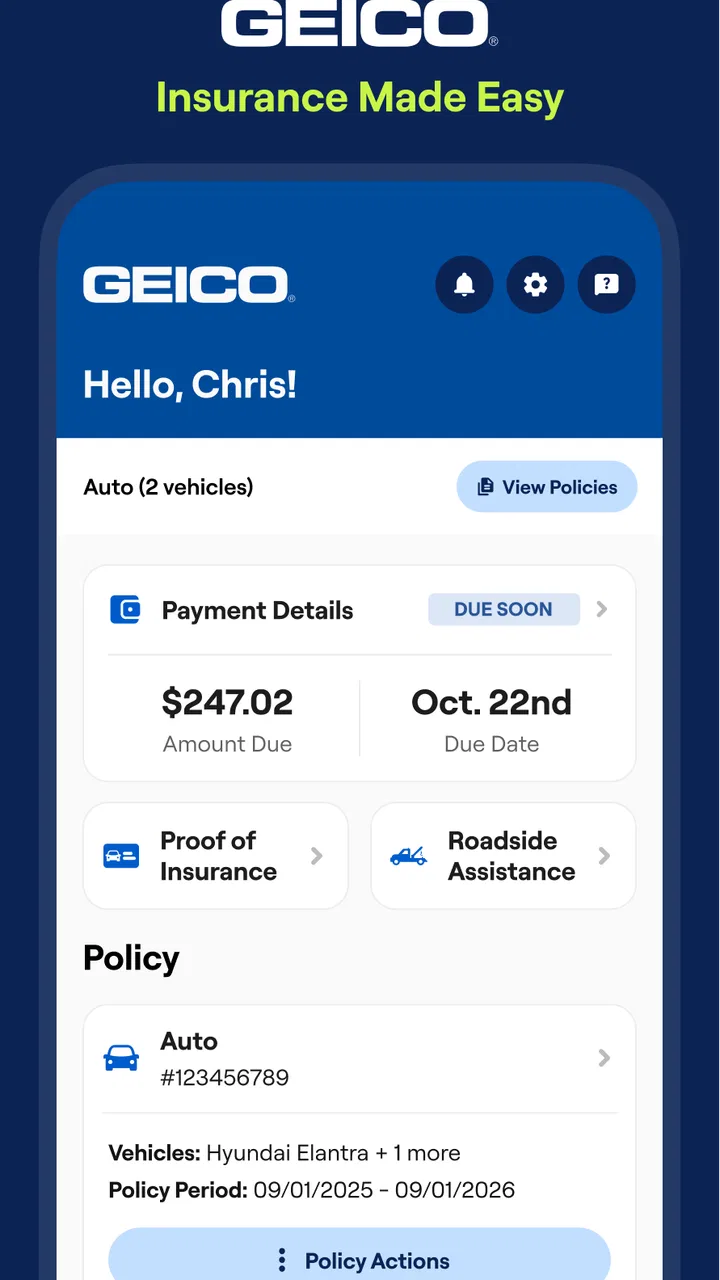
The GEICO Mobile app provides a comprehensive suite of features for policyholders. Users can view their insurance ID cards, pay bills, and manage policies directly from the app. It also offers roadside assistance, vehicle service history, and easy access to customer support. The app's virtual assistant, Kate, helps answer insurance-related questions quickly.
02Is the GEICO Mobile app secure for managing my insurance details?
Yes, the GEICO Mobile app prioritizes user security with advanced encryption and security protocols to protect your personal and financial information. It requires secure login credentials, and users can enable biometric authentication for an additional layer of security when accessing their account details.
03Can I file a claim using the GEICO Mobile app?
Absolutely, the GEICO Mobile app streamlines the claims process by allowing users to file and track claims directly from their smartphone. Users can document accidents with photos, schedule damage assessments, and receive updates throughout the claims process, making it convenient and efficient.
04Does the GEICO Mobile app offer any tools for safe driving?
Yes, the app includes several features designed to promote safe driving. The DriveEasy program, available in certain areas, monitors driving habits and provides feedback to help improve driving skills. Safe drivers may even qualify for discounts on their car insurance premiums, incentivizing responsible behavior.
05Is roadside assistance available through the GEICO Mobile app?
Roadside assistance is easily accessible through the GEICO Mobile app. Users can request help for services like towing, jump-starts, lockout assistance, and fuel delivery. The app allows you to track the location and estimated arrival time of the service provider, ensuring a hassle-free experience during emergencies.
Pros
- User-friendly interface for easy navigation.
- Quick access to insurance ID cards.
- Efficient roadside assistance feature.
- Customizable payment options available.
- Real-time claim tracking updates.
Cons
- Occasional app crashes reported.
- Limited features without internet connection.
- Some users find login process slow.
- Customer service chat can be unresponsive.
- App notifications can be overwhelming.

GEICO Mobile - Car Insurance
Gallery